
iPhone 13 eSIM compatibility: the first to run two eSIMs at once (2026)
Yes, the iPhone 13 is eSIM compatible, as are the iPhone 13 mini, iPhone 13 Pro and iPhone 13 Pro Max. But it brings something the previous models did not have: it is the first iPhone able to run two active eSIMs at the same time, not just one eSIM alongside the physical SIM card.
In this 2026 rundown, we answer everything the question raises: how to check your model's eSIM compatibility in thirty seconds with the EID number, how to activate the eSIM step by step with a QR code, what dual eSIM concretely changes compared with an iPhone 12, how to set up your two lines before going abroad so you pay no roaming, what the mini, Pro and Pro Max variants are worth, and what to do when installation refuses to start.
We finish with choosing a travel eSIM plan for an iPhone 13, and the exceptions tied to the device's country of purchase.
Is your device eSIM compatible?
Pick your brand, then your model: instant verdict.
Is the iPhone 13 eSIM compatible?
Yes, unreservedly. All four models released in September 2021 handle the eSIM: iPhone 13, iPhone 13 mini, iPhone 13 Pro and iPhone 13 Pro Max. It is the fourth iPhone generation to do so, after the XS and XR, the 11 and the 12.
Checking your unit takes thirty seconds: open Settings, then General, then About, and scroll to the bottom. If an EID line shows, the eSIM chip is there. That 32-digit identifier is requested by some providers at order time.
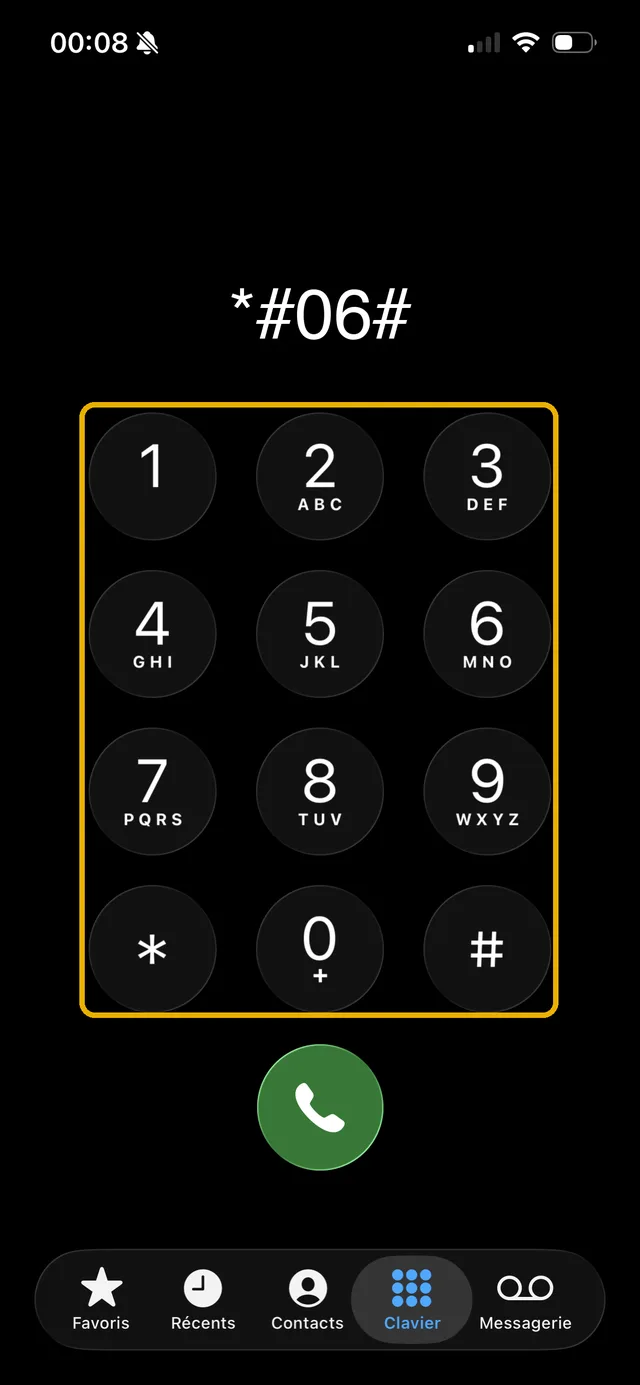
Even faster: dial *#06# in the Phone app. The identifier screen opens right away with the IMEI and EID, without going through the menus.
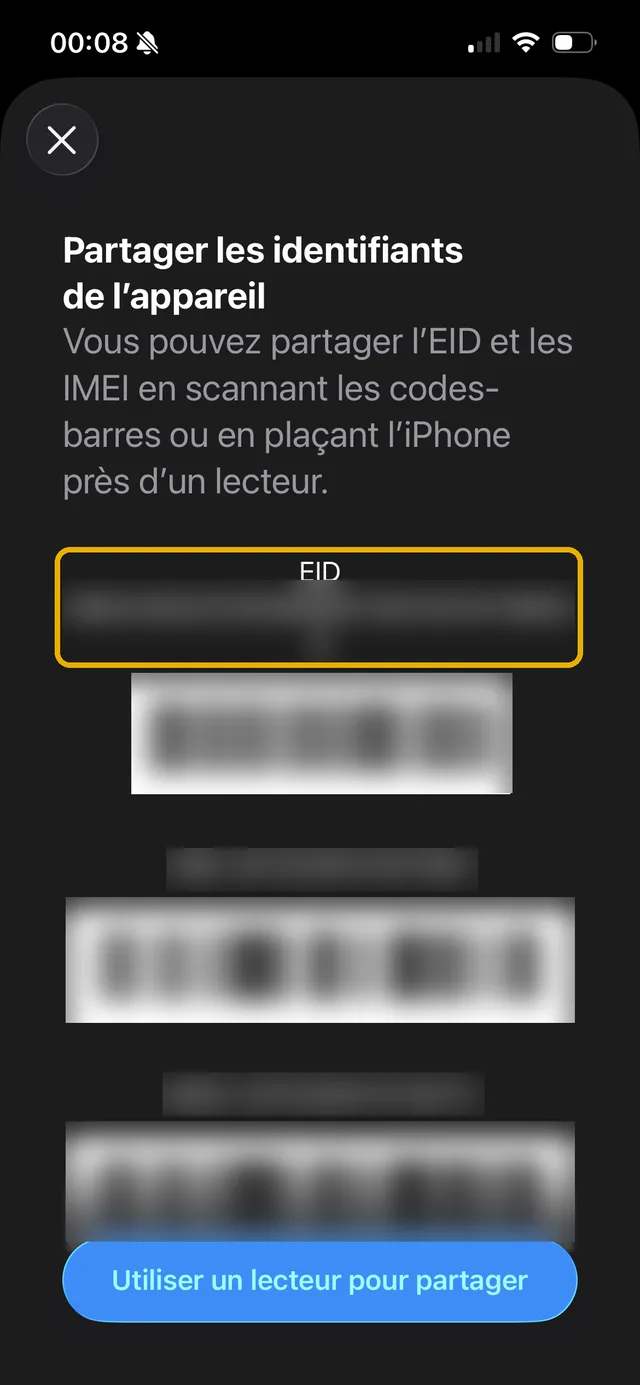
One nuance depends on the country of purchase, not the model. Apple specifies that iPhones sold in Hong Kong and Macao can carry two nano-SIM cards in place of the eSIM. A unit imported from those markets will therefore show no EID line.
The rat's advice: On a second-hand iPhone 13, ask for a screenshot of the Settings, General, About screen before paying. The EID line in the photo is the only proof the unit handles eSIM, whatever the listing promises.
How do you activate an eSIM on iPhone 13?
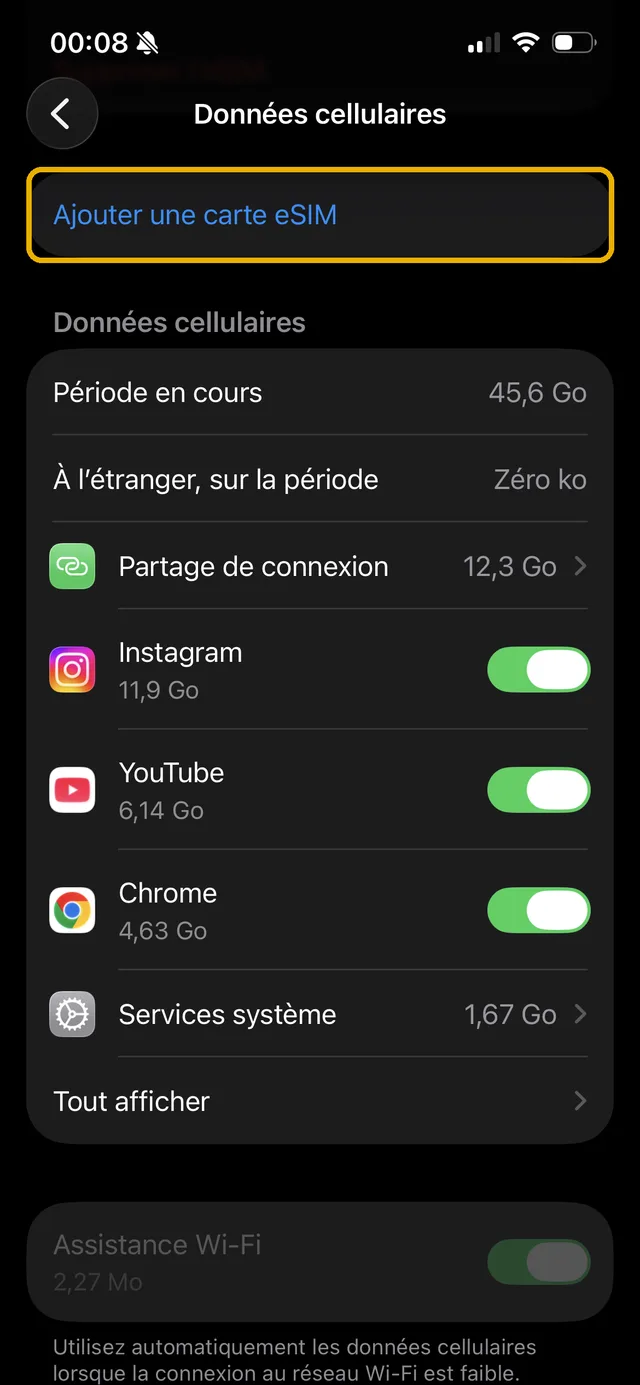
The path is always the same: Settings, Mobile Data, then "Activate mobile plan" or "Add eSIM". Apple then offers three methods, and your provider determines which one you use.
The QR code is the most common route among travel eSIM providers. You receive the code by email after purchase, choose "Use QR code", scan it, then the iPhone asks you to name the line and choose which one carries mobile data.
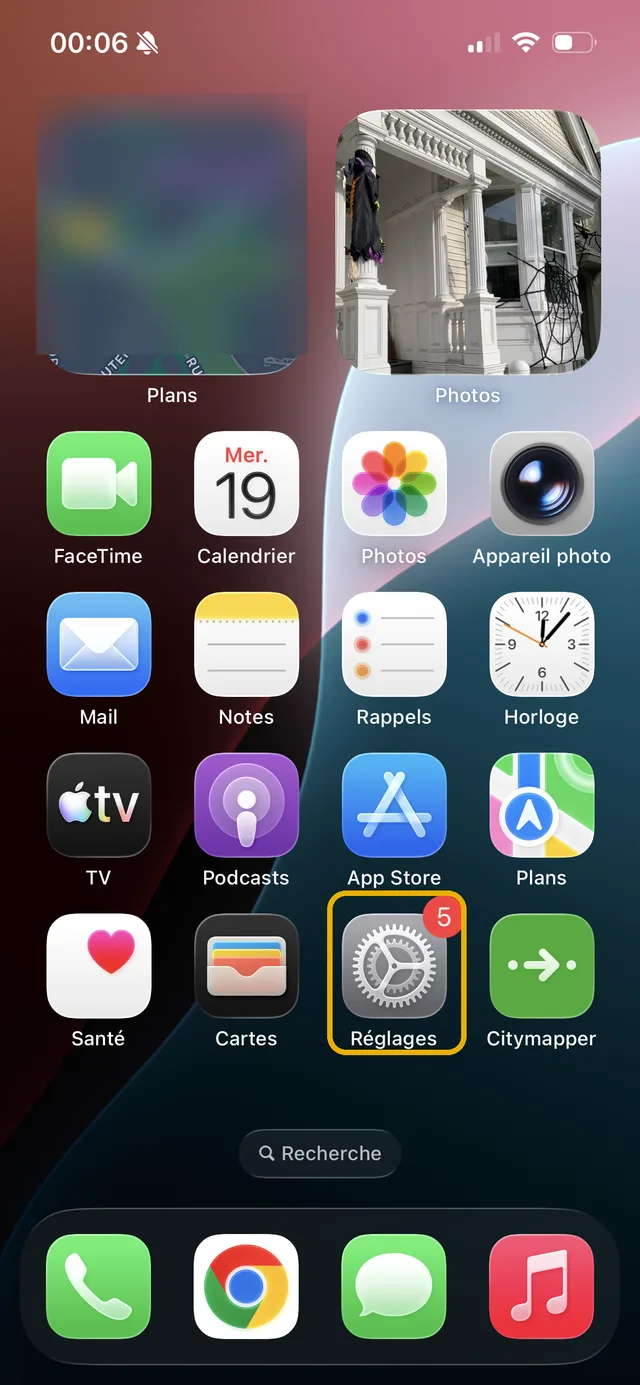
Step 1: open the Settings app.
Step 2: tap the Mobile Data row.
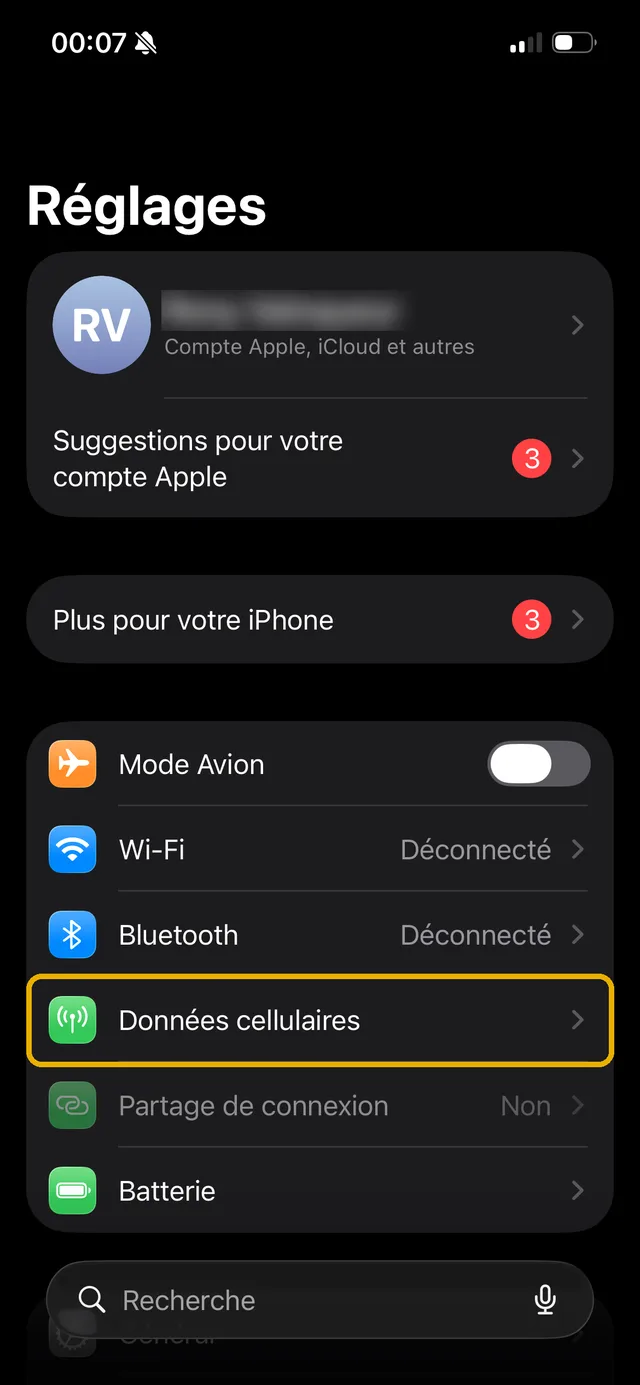
Step 3: choose "Add eSIM", then the method you want.
If you prefer following the operation on video, Apple Support runs through it in under two minutes:
Quick transfer retrieves a line already active on an old iPhone, without going back through the carrier. Conversion turns your nano-SIM into an eSIM if your carrier supports it. In all three cases, you need a Wi-Fi connection and an unlocked phone.
Two active eSIMs: what the iPhone 13 really changes
That is the real break of this generation, and it often goes unnoticed. Apple states it unambiguously: "iPhone 13 models and later also support Dual SIM with two eSIMs, in addition to a physical SIM card and an eSIM."
Concrete translation. On an iPhone 12, Dual SIM necessarily meant a physical nano-SIM plus an eSIM: a single active virtual profile at a time. On an iPhone 13, you can run two eSIM profiles in parallel, with no plastic card in the tray at all.
For a traveller, that unlocks a combination previous models forbade: convert your home plan to an eSIM, keep your number for calls and texts, and add a second local eSIM for data, all while leaving the SIM tray empty. No more card to extract, no more risk of losing it in an airport.
One condition set by Apple is worth knowing: to have two different carriers coexist, the iPhone must be unlocked. If it is not, both plans must come from the same carrier. The detail on profile counts, eight or more stored in memory, is in our article on how many eSIMs an iPhone can handle.
Setting up your two lines properly before going abroad
Having two active lines is useless if the iPhone decides on its own which one consumes data. It is this setting, not the installation, that decides the size of your bill when you get home.
In Settings then Mobile Data, open your home line and disable data roaming. Your number stays reachable for calls and texts, without consuming a byte out of plan.
On your travel eSIM, do the opposite: set it as the default data line and leave roaming enabled. That is exactly what you bought, a data plan at a price known in advance.
One trap specific to two-line devices remains: the "Allow mobile data switching" option. Left on, it lets the iPhone switch to your home line on its own when the eSIM's network weakens. That is the scenario that produces nasty surprises, and it is more likely on an iPhone 13 precisely because it handles two data lines.
The rat's advice: Make these three settings before take-off, not on arrival. Stepping off the plane, your phone latches onto the first available network within seconds, and if it does so with roaming still active on your home line, the damage is done.
iPhone 13 mini, Pro and Pro Max: compatibility by variant
All four models behave the same with the eSIM, active dual eSIM included. Size and sensors change, connectivity does not.
iPhone 13 mini: eSIM compatible, 5.4-inch display. Its compact size removed no connectivity feature, a frequent question with a clear-cut answer.
iPhone 13 and iPhone 13 Pro: eSIM compatible, 6.1-inch display, the Pro adding a telephoto lens and the 120 Hz ProMotion display.
iPhone 13 Pro Max: eSIM compatible, 6.7-inch display, same two-line handling.
If you hesitate between two second-hand units, eSIM compatibility settles nothing. The country of purchase remains the only variable that can deprive the device of its chip.
The eSIM will not install on your iPhone 13: the frequent cases
Error messages are rarely explicit. In practice, almost every blocker comes down to five causes, none of which requires technical skill.
The QR code has already been used. A profile installs only once: if it has been scanned, even on another device, you must ask the provider for a new one.
The phone is carrier-locked. Especially annoying on an iPhone 13, since the lock also forbids two different carriers from coexisting. Unlocking is requested from the original carrier.
The connection is unstable. The profile downloads from the carrier's servers: on weak Wi-Fi, installation fails without explanation.
The country of purchase. With no EID line in the settings, there is nothing to try: the unit has no eSIM chip.
No data even though the profile is installed. Nine times out of ten, the eSIM is not set as the default data line, or roaming stayed off on that line. Both settings live in Mobile Data. Apple also maintains a page dedicated to eSIM setup failures.
Which travel eSIM for your iPhone 13?
An unlocked iPhone 13 gives access to every provider on the market: Airalo, Holafly, Saily, Ubigi, Nomad, Yesim, voilà and others. Each has its positioning, between unlimited data, multi-country coverage and price per gigabyte. voilà, for instance, positions itself on value for money, with an eSIM that is easy to install and an easy-to-use app, and human customer support reachable 24/7.
The right choice depends on your destination, your data volume and the length of the stay. That is the trade-off the comparator settles, with hand-checked prices: the page of compared eSIM carriers and providers gives the overview, destination by destination.
In short: the iPhone 13 accepts eSIMs in all its variants, it is the first to run two active at once, installation takes two minutes with a QR code, and the only real trap remains the device's country of purchase.
Frequently asked questions
Is the iPhone 13 eSIM compatible?
How many eSIMs can be active on an iPhone 13?
Is the iPhone 13 Dual SIM?
Can you use two different carriers on an iPhone 13?
How do you activate an eSIM on iPhone 13?
Does the iPhone 13 mini also handle two eSIMs?
Do you need to remove your SIM card to use two eSIMs?
What is the difference with the iPhone 12 for eSIM?
Most read
 August 18, 202614 min read
Free Mobile country list: the destinations included abroad (2026)
Free 5G+ plan: 35 GB across 117 destinations. Free Max: unlimited in over 140. The full list of included countries, the limits and the plan B.
 Rony
Rony July 28, 20267 min read
Squeezie eSIM: should you use the Saily promo code?
Squeezie sponsors the Saily eSIM with a -15% promo code. We break down the offer, compare price per GB and tell you whether it is really the best deal.
Rony August 28, 202610 min read
Free eSIM: what is actually free, and what is not (2026)
Six eSIMs with real free data, as reported on September 15, 2026, from providers, their terms and conditions, and when paying €0.80 becomes the smarter choice.
Rony August 19, 20269 min read
La Poste Mobile eSIM: not available yet, and here is when that changes (2026)
La Poste Mobile does not offer eSIM yet, only physical SIM cards. Announced launch date, alternatives and compatible phones in 2026.
Rony August 25, 202610 min read
Numero eSIM review: legit or not? What the ratings don't tell you (2026)
Suspended Trustpilot rating, 3.5/5 on the App Store, disputed charges: our full Numero eSIM review, with verified prices and the alternatives.
Rony August 26, 20269 min read
Does WhatsApp use mobile data? How much, and how to stay in control (2026)
WhatsApp eats into your data plan: from 0.01 MB per message to 20 MB per minute of video call. The numbers, the settings that save your plan, the travel case.
Rony