
iPhone 14 eSIM compatibility: the first iPhone sold without a SIM tray in the US (2026)
Yes, the iPhone 14 is eSIM compatible, across the whole line-up: iPhone 14, 14 Plus, 14 Pro and 14 Pro Max. And this model even marks a turning point: it is the first iPhone sold without a SIM tray in the United States, where it runs on eSIM only. In Europe and most of the world, it combines a physical nano-SIM with eSIM, and can keep two eSIMs active at once.
In this guide, we cover it all: the eSIM compatibility confirmed by Apple's official tech specs, the special case of the US model (and the trap when buying second-hand or imported), the three ways to activate an eSIM on iPhone 14 with screenshots, dual eSIM management, country variants (including mainland China, sold without eSIM), the common blockers, and how to pick a travel eSIM for your next trip.
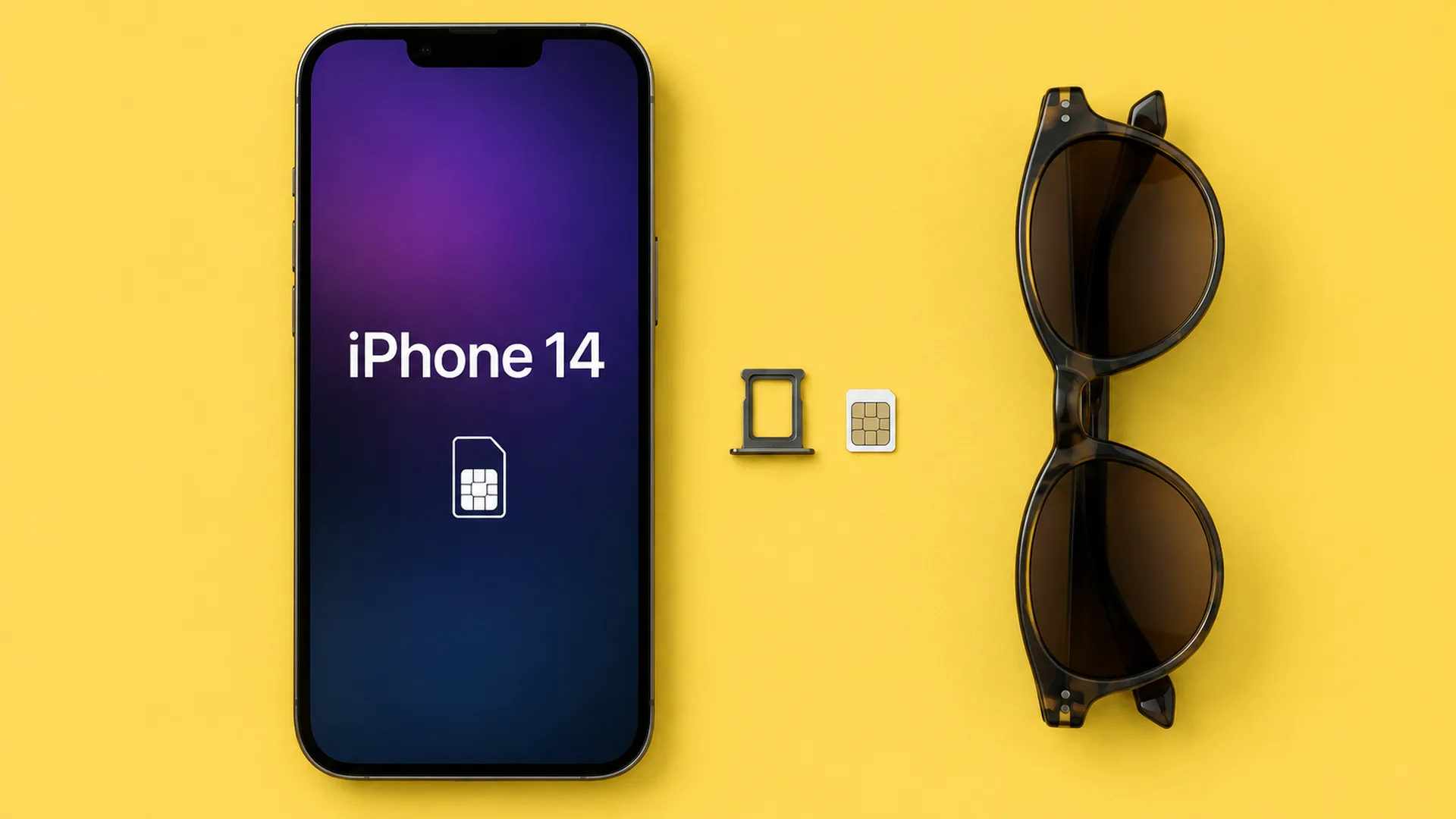
Is the iPhone 14 eSIM compatible?
Yes, with no model exception: iPhone 14, iPhone 14 Plus, iPhone 14 Pro and iPhone 14 Pro Max all support eSIM. Apple's official tech specs are explicit: "Dual SIM (nano-SIM and eSIM)" and "dual eSIM support". In other words, the phone handles one physical card plus an eSIM, or two eSIMs at once.
Released in September 2022, the iPhone 14 arrived four generations after Apple introduced eSIM (iPhone XS and XR, late 2018). By then the technology was mature: multiple stored profiles, transferring an eSIM from an old iPhone in seconds, activation with no store visit and no mail. If the concept of a virtual SIM card is new to you, our guide on what an eSIM is starts from the beginning.
The real novelty of this generation is not compatibility but the switch: the iPhone 14 is the first iPhone sold without a SIM tray on a major market. The footnote in Apple's specs says it plainly: the nano-SIM tray is "available on models purchased outside the United States". We detail that case right below, because it directly affects second-hand buyers and importers.
Source: Apple's official iPhone 14 tech specs, checked on 26 August 2026.
The American model: eSIM only
An iPhone 14 bought in the United States physically has no SIM tray: no plastic card can ever go in, your line has to run on eSIM. For use in Europe that is not blocking (all major carriers offer eSIM), but it is a constraint to know before buying an imported unit: no physical prepaid card as a fallback, no swapping SIMs between phones, and a carrier without eSIM support is simply unusable.
How do you spot a US model? Easiest check: look at the phone's edge, there is no tray at all. You can also dial *#06#: an EID number shows on every iPhone 14 (that is the eSIM module's signature), but on a US model no physical SIM serial accompanies it. Our eSIM compatibility checker walks you through the check.
The rat's tip: a "cheap" iPhone 14 on a classified ad is sometimes an imported American model. Not a defect in itself, but check two things before paying: that it is carrier-unlocked, and that your carrier offers eSIM. Without both, you are buying a very pretty paperweight.
How to activate an eSIM on iPhone 14
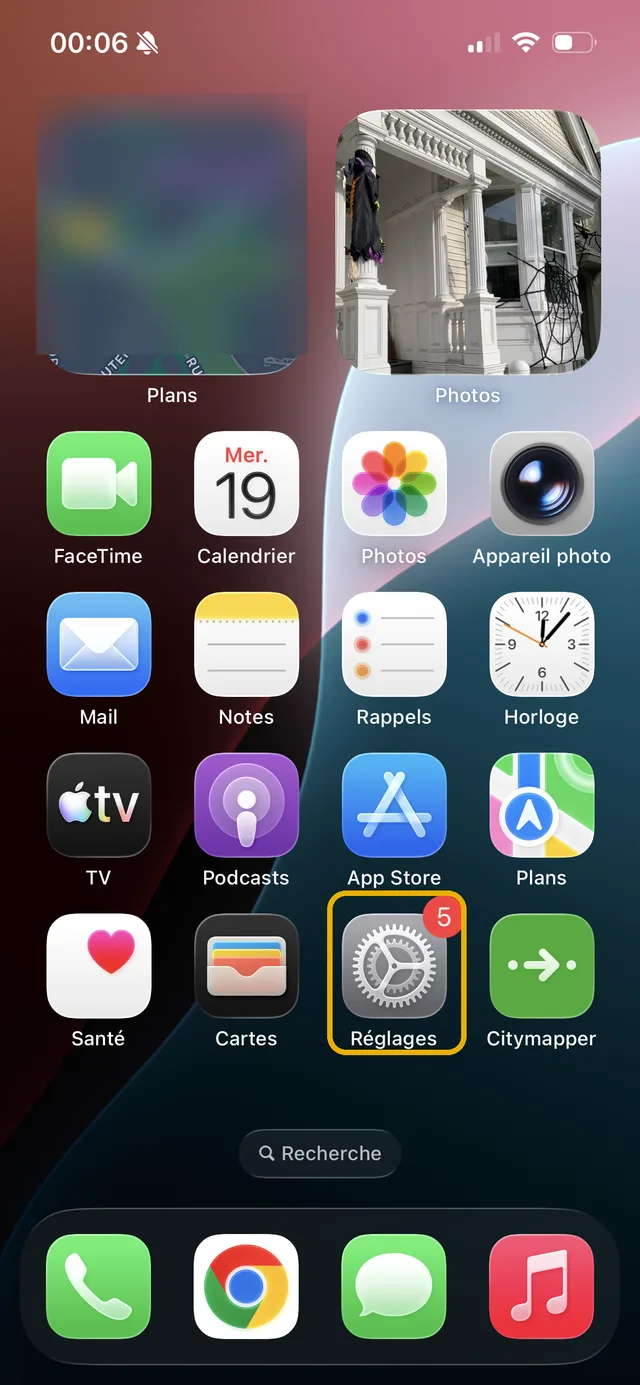
Three methods, from easiest to most manual. First: quick transfer from your old iPhone. During initial setup (or from Settings, Cellular, Add eSIM, Transfer from nearby iPhone), your line moves from the old phone to the iPhone 14 in minutes, without contacting the carrier. Apple documents the process on its About eSIM on iPhone page.
Second: the QR code provided by your carrier or travel eSIM seller. Open the Settings app from the home screen:
Tap "Cellular", then "Add eSIM":
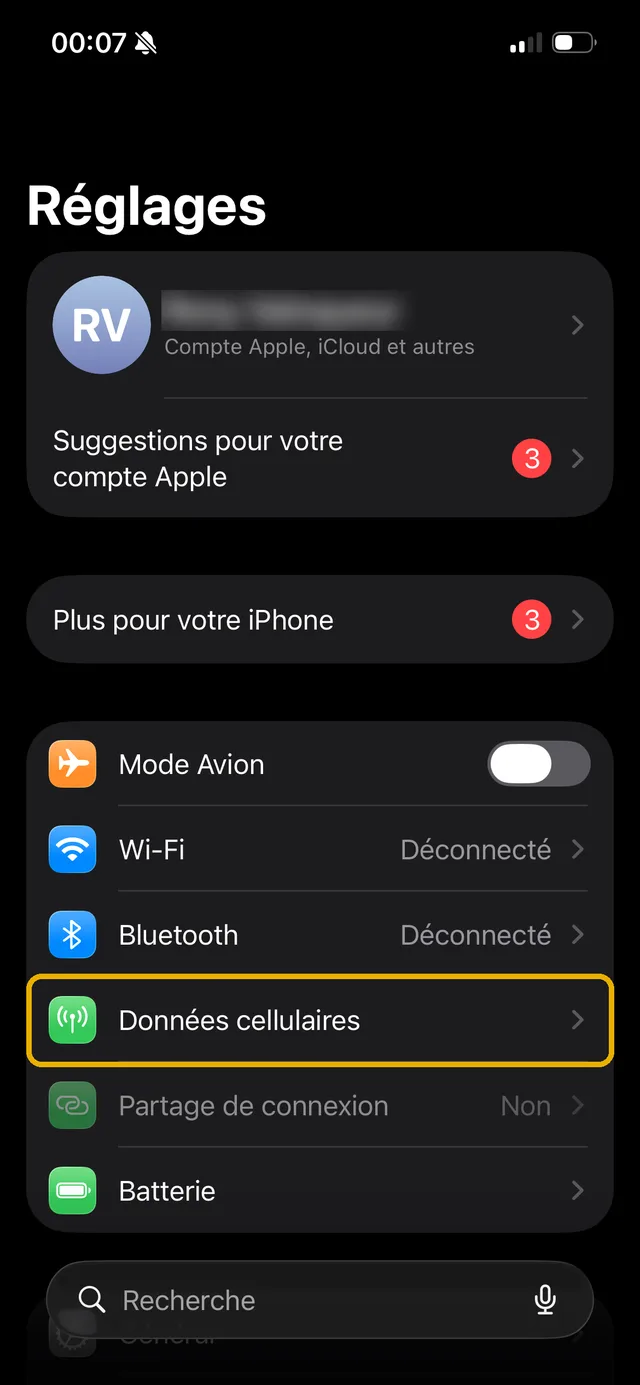
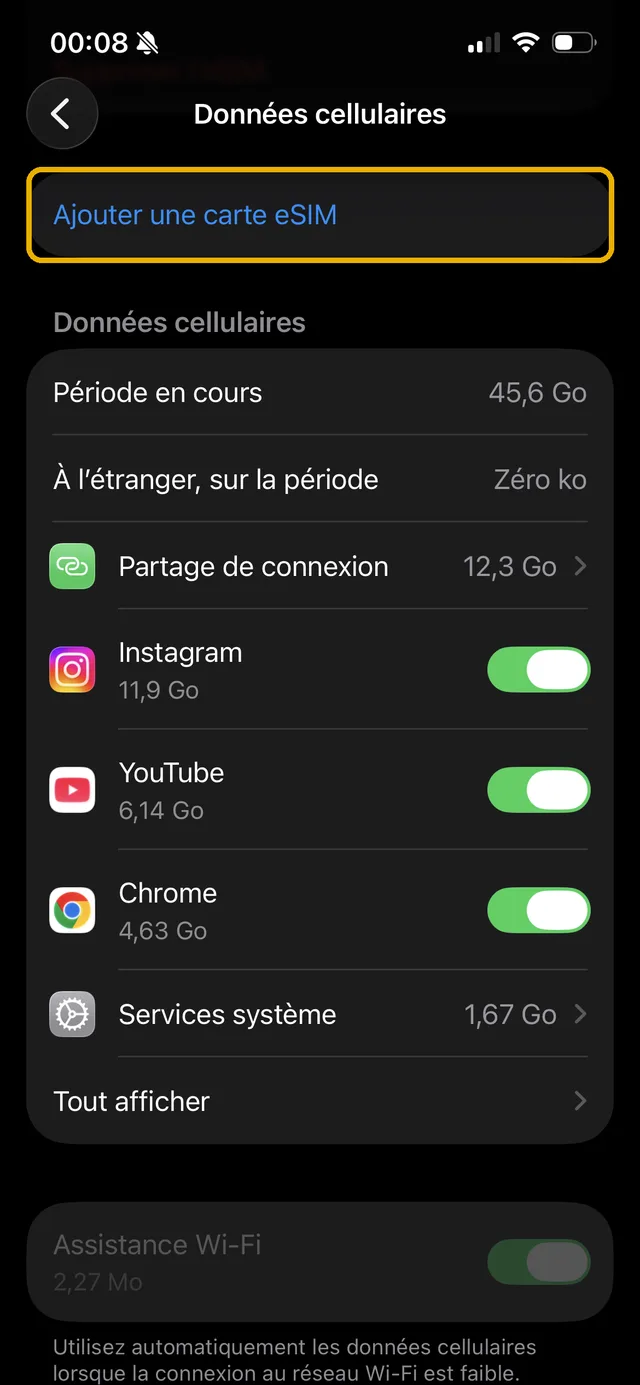
Scan the QR code with the camera, confirm, and the line installs. Third method: the carrier's app (or the travel eSIM provider's), which installs the profile directly, often without scanning anything.
One tip that applies to all three methods: install on wifi, and for a travel eSIM, install before departure but only activate the line on arrival: validity usually starts at activation.
Dual eSIM: two active lines on your iPhone 14
The iPhone 14 stores several eSIM profiles in memory and keeps two active at the same time, with or without a nano-SIM depending on your model. Concretely: your home line stays reachable while a local eSIM provides data abroad, or a work line and a personal line live on the same phone. Apple details the setup on its Using Dual SIM with an eSIM page.
In Settings, Cellular, you choose which line carries mobile data, which one handles calls and texts, and you rename each line ("Personal", "Japan trip"...) to keep things clear. The exact number of installable eSIMs varies with the module's storage, but it far exceeds real needs: we covered the question in our article on how many eSIMs an iPhone can have.
Before a trip, the setting that avoids nasty surprises: home line active for calls and texts (bank verification included) but data roaming off on that line, and mobile data switched to the travel eSIM. Zero roaming fees, zero missed texts.
iPhone 14, 14 Plus, 14 Pro, 14 Pro Max: country variants
eSIM compatibility is identical across the four models. What changes is the SIM configuration depending on the country of purchase:
| Country of purchase | SIM configuration | eSIM? |
|---|---|---|
| United States | eSIM only, no tray | ✅ Mandatory |
| Europe and most of the world | Nano-SIM + eSIM (dual eSIM possible) | ✅ Yes |
| Mainland China | Dual nano-SIM | ❌ No |
The costliest trap is the mainland China model: sold with two nano-SIM trays and no eSIM module at all, it will never install a travel eSIM, whatever the software update. On the second-hand market and import sites, always check: dial *#06#, and if no EID line shows up, walk away. The full list of models and country traps is in our guide to eSIM compatible iPhones.
The eSIM won't install on your iPhone 14: common cases
First reflex if "Add eSIM" leads nowhere: check that the iPhone is carrier-unlocked. A phone locked to a carrier (common on subsidised or imported units) refuses other networks' profiles. The information sits in Settings, General, About, under "Carrier Lock": it should read "No SIM restrictions".
Second case: the QR code has already been used. An eSIM profile is single-use: once scanned (even on another phone, even without being activated), you need to request a new one from the provider.
Third case: an unstable network during installation. Switch to wifi, keep the iPhone updated (Settings, General, Software Update), restart, then retry. If nothing works, the eSIM seller's support can push the profile remotely or generate a fresh one.
Which travel eSIM for your iPhone 14?
With dual eSIM, the iPhone 14 is a great travel companion: your usual line stays in place, the local eSIM provides the data, and your WhatsApp number does not change. What remains is picking the right plan: prices vary threefold between providers and destinations.
That is exactly what esimrat compares: plans from several providers, destination by destination, ranked by price per GB, with verified promo codes. Pick your destination, compare eSIM providers, and travel connected without roaming fees.
The rat's tip: install the travel eSIM at home, on wifi, the day before you leave. When you land, all that is left is activating the line and switching mobile data to it: two minutes, stopwatch in hand.
Frequently asked questions
Is the iPhone 14 eSIM compatible?
Does the iPhone 14 still have a physical SIM card?
How do I activate an eSIM on an iPhone 14?
How many eSIMs can the iPhone 14 use at the same time?
How do I know if my iPhone 14 is a US eSIM-only model?
Which travel eSIM should I choose for an iPhone 14?
Most read
 August 18, 202614 min read
Free Mobile country list: the destinations included abroad (2026)
Free 5G+ plan: 35 GB across 117 destinations. Free Max: unlimited in over 140. The full list of included countries, the limits and the plan B.
 Rony
Rony July 28, 20267 min read
Squeezie eSIM: should you use the Saily promo code?
Squeezie sponsors the Saily eSIM with a -15% promo code. We break down the offer, compare price per GB and tell you whether it is really the best deal.
Rony August 28, 202610 min read
Free eSIM: what is actually free, and what is not (2026)
Six eSIMs with real free data, as reported on September 15, 2026, from providers, their terms and conditions, and when paying €0.80 becomes the smarter choice.
Rony August 19, 20269 min read
La Poste Mobile eSIM: not available yet, and here is when that changes (2026)
La Poste Mobile does not offer eSIM yet, only physical SIM cards. Announced launch date, alternatives and compatible phones in 2026.
Rony August 25, 202610 min read
Numero eSIM review: legit or not? What the ratings don't tell you (2026)
Suspended Trustpilot rating, 3.5/5 on the App Store, disputed charges: our full Numero eSIM review, with verified prices and the alternatives.
Rony August 26, 20269 min read
Does WhatsApp use mobile data? How much, and how to stay in control (2026)
WhatsApp eats into your data plan: from 0.01 MB per message to 20 MB per minute of video call. The numbers, the settings that save your plan, the travel case.
Rony