
Is the iPhone 8 eSIM compatible? No, and here are your options (2026)
No, the iPhone 8 is not eSIM compatible. Like the iPhone 8 Plus, this 2017 model works exclusively with a physical nano-SIM card: no eSIM module is built into the phone, and no update can add one. eSIM technology arrives at Apple a year later, with the iPhone XS, XS Max and XR.
In this rundown, we show you how to check any iPhone's eSIM compatibility in 30 seconds, screenshots included: in the settings via "Mobile Data", or by dialling *#06# to display the EID number. We then list the iPhone models that support eSIM, from the XS to the iPhone Air, the compatible Android devices (Samsung Galaxy, Google Pixel), and above all the concrete alternatives if you keep your iPhone 8: a physical SIM card when travelling, upgrading to a compatible model, and what to do with an eSIM you already bought.
As a bonus: the official Apple video to set up an eSIM the day you change phones.
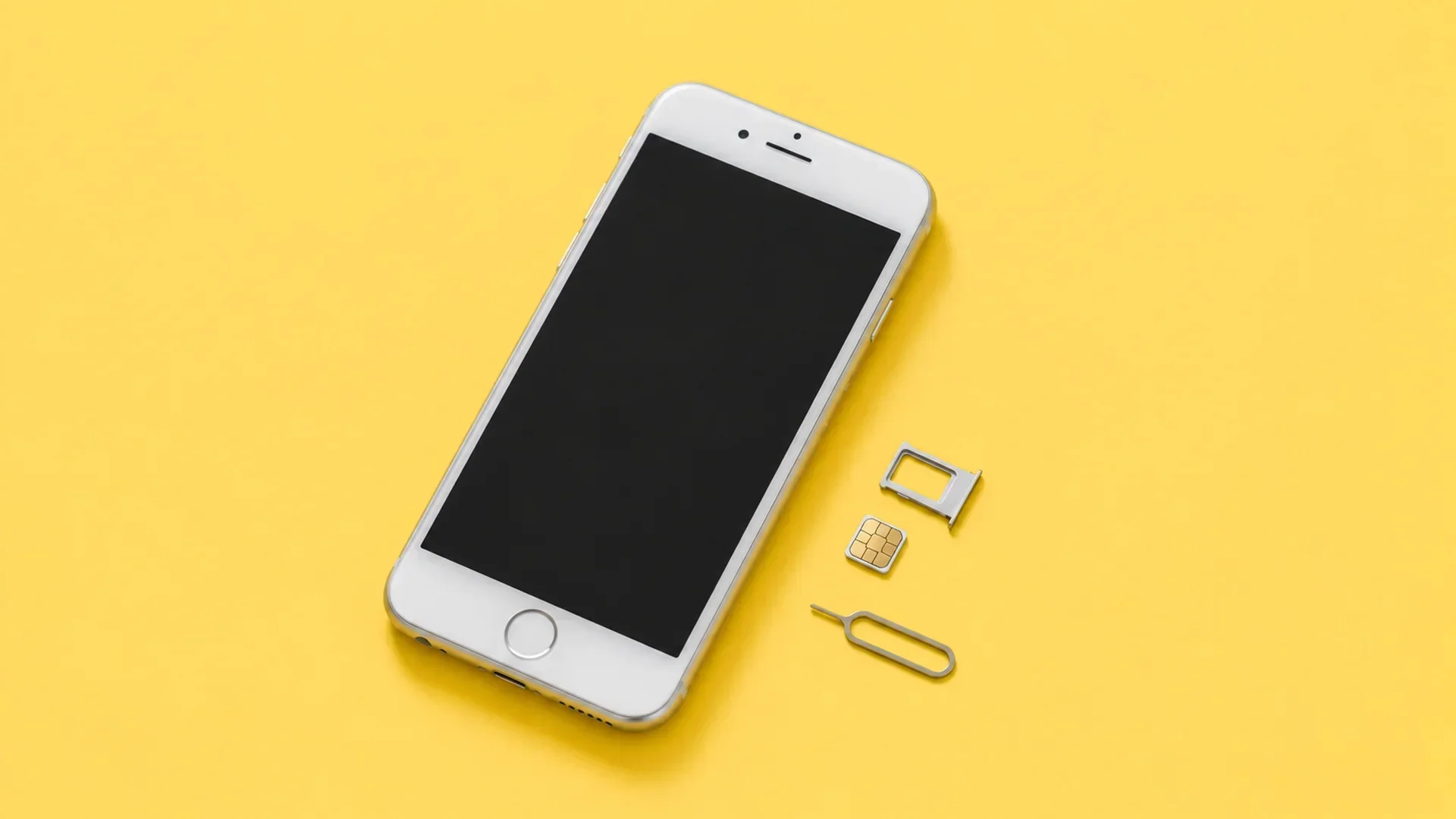
Is the iPhone 8 compatible with eSIM?
No, the iPhone 8 is not compatible with eSIM. Apple's official spec sheet is unambiguous: on the SIM side, this model takes a nano-SIM, and nothing else. No built-in eSIM module means no downloadable eSIM profile, today or ever: it is a hardware limit, not a software one.
eSIM technology lands at Apple with the next generation, in late 2018: iPhone XS, XS Max and XR. The iPhone 8, released in September 2017 with the A11 Bionic chip, its 4.7-inch Retina HD display and 64 to 256 GB of storage, belongs to the last 100% physical SIM generation, together with the iPhone X released the same year. Same verdict for the iPhone 8 Plus.
If you want to understand what this virtual SIM card changes day to day, our what is an eSIM article covers it all from the beginning. The essence fits in one sentence: an eSIM is a chip soldered into the smartphone, onto which you download a mobile plan in a few minutes, with no plastic card.
Source: Apple's official iPhone 8 spec sheet, consulted on 19 August 2026.
How do you check whether your iPhone is eSIM compatible?
Two reliable methods, 30 seconds each, valid for every iPhone model, and our eSIM compatibility checker runs the test in two clicks for every brand. The screenshots below come from a compatible iPhone: on an iPhone 8, the options framed in yellow simply do not appear. That is precisely the test.
First method, through the settings. 1. Open the Settings app from the home screen.
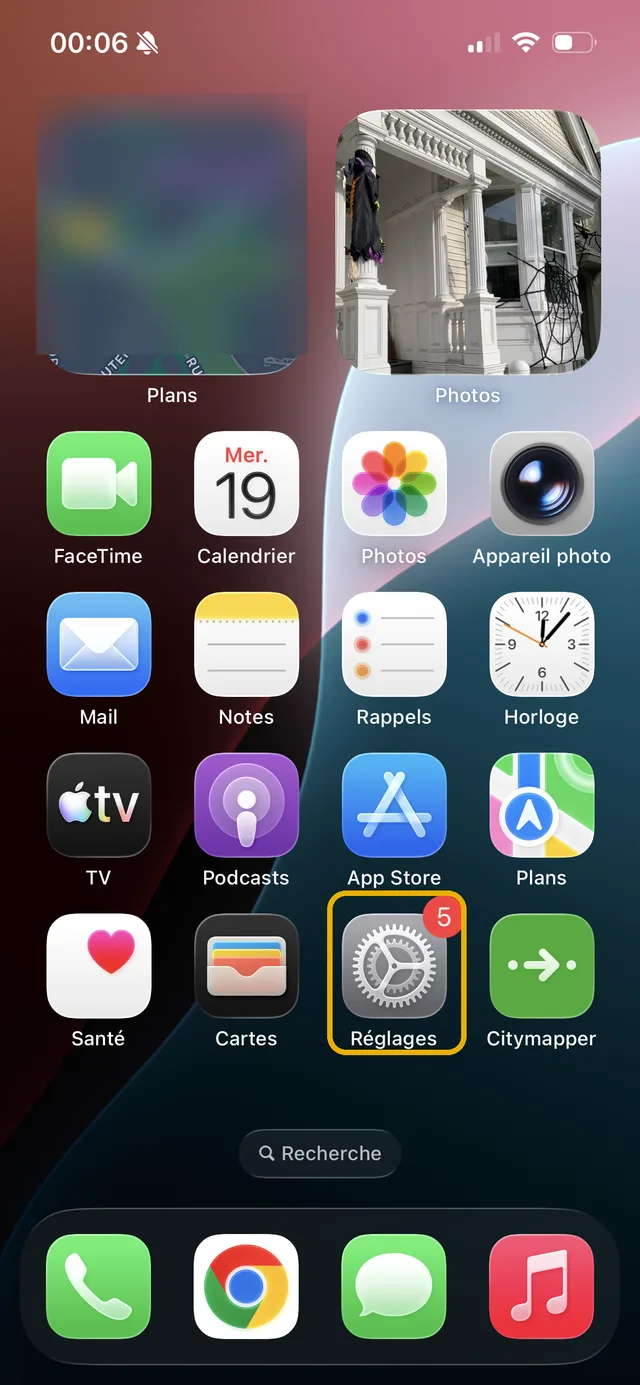
2. Tap "Mobile Data" in the list.
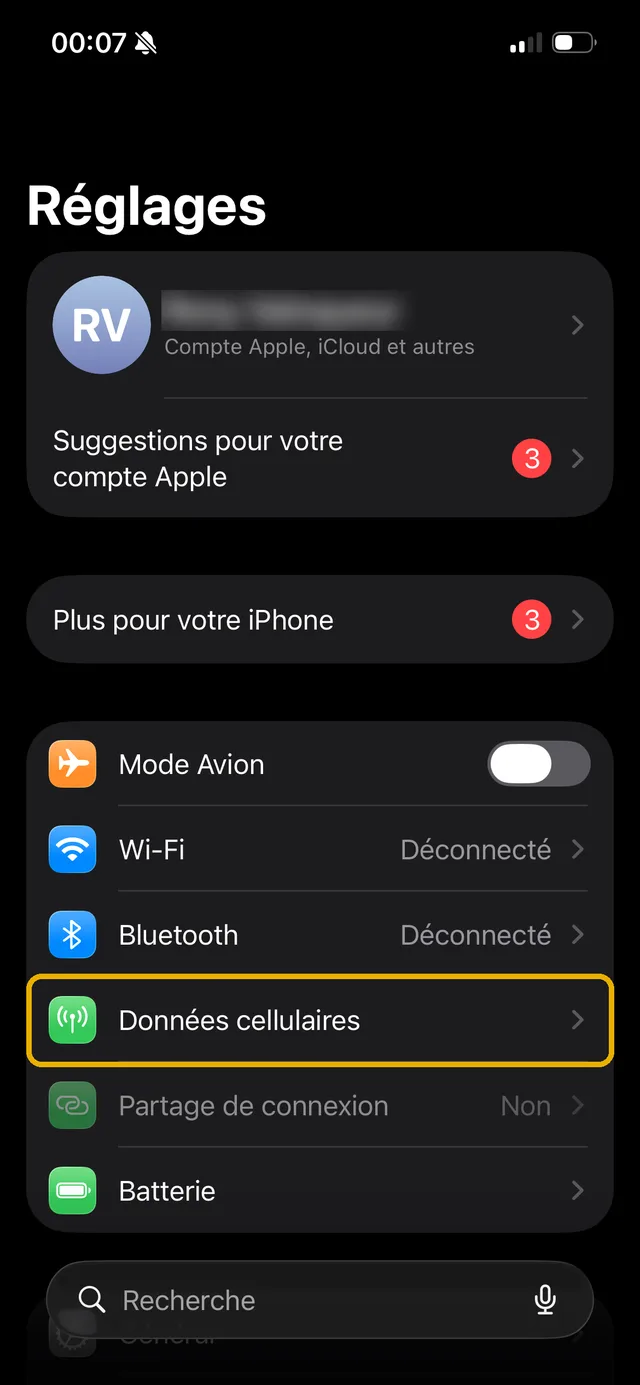
3. Look for the "Add eSIM" button (or "Add Mobile Plan" on older iOS versions). If it shows up, your phone is eSIM compatible. If it does not exist, as on the iPhone 8, the device does not support eSIM.
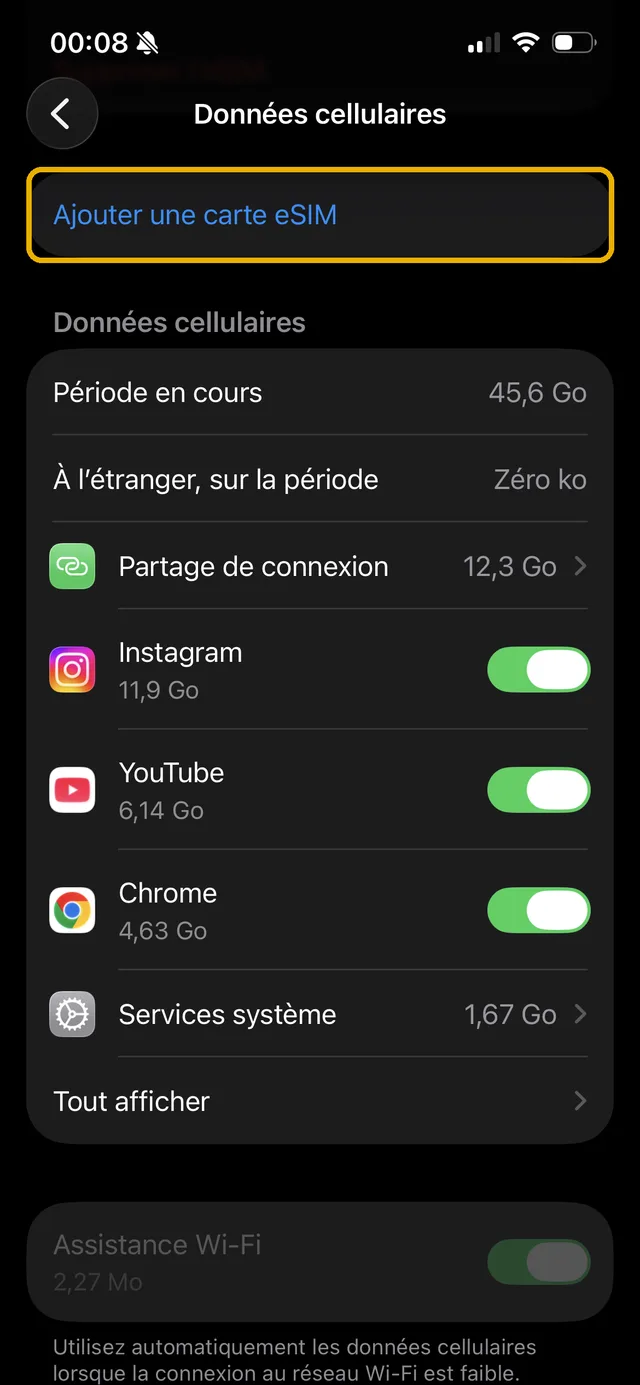
Second method, with the *#06# code. 1. Open the Phone app, Keypad tab, and dial *#06#: the identifier screen appears automatically, without pressing the call button.
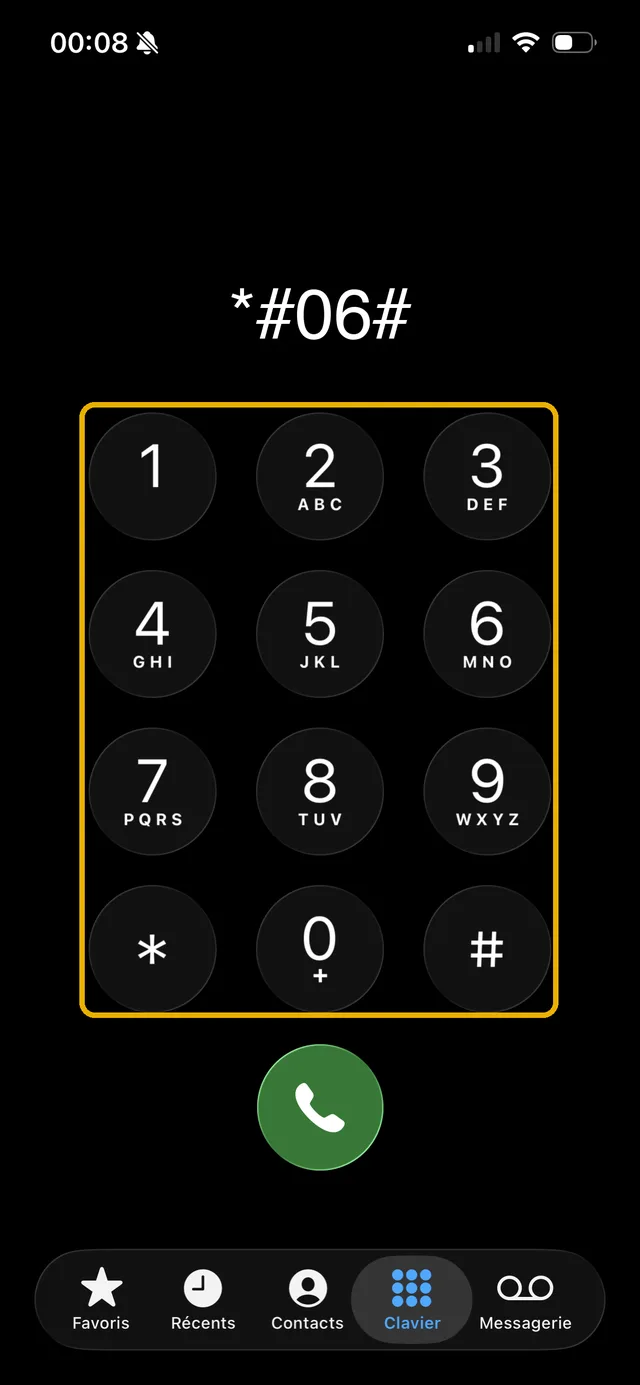
2. Look for the EID line, a 32-digit identifier: its presence confirms the eSIM module. On an iPhone 8, you will only see the IMEI, never an EID. Apple also documents this check on its identify your iPhone's SIM card type page.
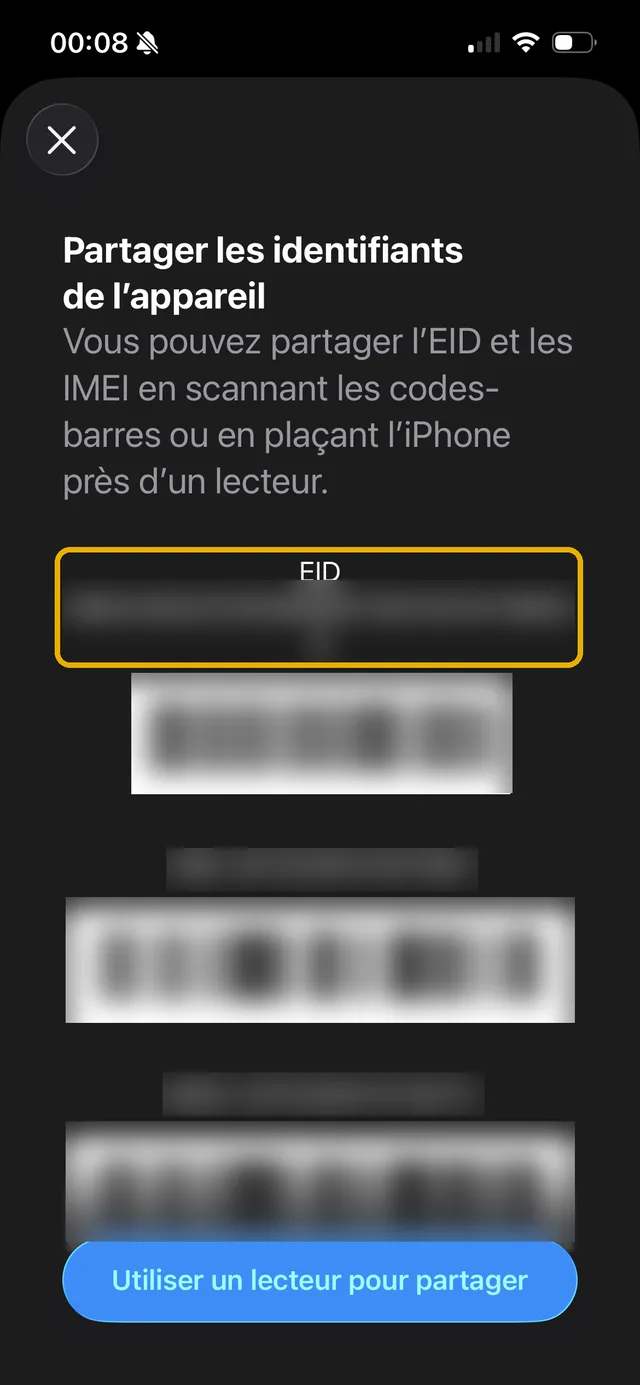
The rat's advice: Buying a second-hand iPhone to replace your 8? Do not take the listing at its word. Ask for a screenshot of that *#06# screen before paying: no EID line, no eSIM. It spares you the bad surprise of a mainland China or Hong Kong model, sold without an eSIM module even on recent generations.
Which iPhone models support eSIM?
Every Apple iPhone released since late 2018 supports eSIM: iPhone XS, XS Max, XR, the 11, 12, 13, 14, 15, 16 and 17 series (including the mini, Plus, Pro and Pro Max variants), the iPhone SE 2020 and 2022, the iPhone 16e, the 17e, and the iPhone Air which even runs eSIM only, with no SIM tray. We keep the full list of eSIM compatible iPhones up to date, with the traps by country of purchase.
Compared with your iPhone 8, the first compatible model available refurbished is therefore the iPhone XR or iPhone XS, and the price-to-longevity ratio often favours the iPhone 11 or the SE 2020, more recent and still updated. All of them take an eSIM on top of the physical card.
On the Android side, eSIM is also standard on recent ranges: Samsung Galaxy S20 through S25, Galaxy Z Fold and Z Flip, Galaxy Note 20, Google Pixel since the Pixel 4, recent Xiaomi and Redmi Note, Motorola, Sony Xperia, Honor. And the Apple ecosystem follows the same logic: recent cellular iPad Pro, iPad Air and iPad mini, like the cellular Apple Watch, ship with an eSIM.
What are the alternatives with an iPhone 8?
Not compatible does not mean not connected. Three options depending on your situation, from the cheapest to the most durable.
Option 1: stay on a physical SIM card. In France, all four carriers (Orange, SFR, Bouygues Telecom, Free) still provide nano-SIMs, and when travelling you can buy a local prepaid SIM card on arrival or order a travel SIM before departure. Less convenient than an eSIM (queueing, tray handling, changing number), but it works anywhere your iPhone 8 is unlocked.
Option 2: move to a compatible iPhone, refurbished. That is the most cost-effective option if you travel several times a year: any model from the iPhone XR onwards opens access to every travel eSIM on the market, Airalo, Holafly, Saily, Ubigi, Nomad, Yesim, voilà and the rest. Factually, voilà positions itself on value for money with final displayed prices, an eSIM that is easy to install with an easy-to-use app, and human customer support 24/7; others bet on unlimited data or multi-country coverage. Our page of compared eSIM carriers and providers gives you the full picture, with hand-checked prices.
Option 3: you already bought an eSIM for your iPhone 8 by mistake? The profile is not necessarily lost. You can install it on another compatible, unlocked device in the household, keep it for a future phone if it has not been activated, or contact the provider's support: most refund or credit an eSIM that was never activated, depending on their policy.
The rat's advice: Before buying an eSIM, always run the *#06# test on the phone that will actually travel. A non-activated eSIM is often refundable, an activated one almost never. Two minutes of checking versus euros down the drain, the maths is quick.
How do you set up an eSIM on a compatible iPhone?
The day you move to a compatible iPhone, installing an eSIM takes about 2 minutes, on Wi-Fi. Apple shows the whole procedure in its official video:
In broad strokes: you receive a QR code after buying the plan, you scan it from Settings, Mobile Data, "Add eSIM", and the profile installs itself. The provider's app or the carrier's automatic activation do the job too, and the full walkthrough is on Apple's official support page.
For a concrete example on a popular second-hand model, we detailed the whole procedure, video included, in our iPhone 11 eSIM compatibility article: check, activation, Dual SIM and spec sheet.
In short: the iPhone 8 will remain a 100% nano-SIM phone to the end. To enjoy an eSIM, you will need a device released after 2018, and the *#06# test settles it in 30 seconds, whatever the model.
Frequently asked questions
Is the iPhone 8 Plus eSIM compatible?
Do iPhone SE models support eSIM?
Which carriers support eSIM in France?
Can you travel connected with an iPhone 8 in 2026?
What is the difference between a physical SIM card and an eSIM?
I bought an eSIM for my iPhone 8, is it wasted?
Most read
 August 18, 202614 min read
Free Mobile country list: the destinations included abroad (2026)
Free 5G+ plan: 35 GB across 117 destinations. Free Max: unlimited in over 140. The full list of included countries, the limits and the plan B.
 Rony
Rony July 28, 20267 min read
Squeezie eSIM: should you use the Saily promo code?
Squeezie sponsors the Saily eSIM with a -15% promo code. We break down the offer, compare price per GB and tell you whether it is really the best deal.
Rony August 28, 202610 min read
Free eSIM: what is actually free, and what is not (2026)
Six eSIMs with real free data, as reported on September 15, 2026, from providers, their terms and conditions, and when paying €0.80 becomes the smarter choice.
Rony August 19, 20269 min read
La Poste Mobile eSIM: not available yet, and here is when that changes (2026)
La Poste Mobile does not offer eSIM yet, only physical SIM cards. Announced launch date, alternatives and compatible phones in 2026.
Rony August 25, 202610 min read
Numero eSIM review: legit or not? What the ratings don't tell you (2026)
Suspended Trustpilot rating, 3.5/5 on the App Store, disputed charges: our full Numero eSIM review, with verified prices and the alternatives.
Rony August 26, 20269 min read
Does WhatsApp use mobile data? How much, and how to stay in control (2026)
WhatsApp eats into your data plan: from 0.01 MB per message to 20 MB per minute of video call. The numbers, the settings that save your plan, the travel case.
Rony